FIDELITY HSA®
I want to choose my own investments
- You decide whether to invest your HSA, and what to invest in
- No minimums to open an account or invest4
A tax-advantaged HSA, paired with an HSA-eligible health plan, is one of the best ways to save and pay for qualified medical expenses1—and invest for the future. You can open or transfer an HSA anytime.

Compare health plans to find out if choosing an HSA-eligible option when your enrollment window is open could help reduce your health care costs. Then pair it with an HSA.

Get pre-tax or tax-deductible contributions, plus no immediate tax on earnings and tax-free withdrawals for qualified medical expenses.2

At age 65, you can spend HSA money on anything—just pay income taxes if it’s not a qualified medical expense.

HSA money can accumulate year over year, and stays with you if you change jobs or health plans—and when you retire.
From appointments to prescriptions, an HSA can help you save and pay for qualified medical expenses for yourself, your spouse, and covered dependents—now and in retirement.
From appointments to prescriptions, an HSA can help you save and pay for qualified medical expenses for yourself, your spouse, and covered dependents—now and in retirement.
Account fees
Minimum
Check out how we compare to the largest HSA providers.5
| Key features | Fidelity HSA® | HealthEquity® | Optum Bank® | HSA Bank® |
|---|---|---|---|---|
| Save and invest with no account fees4 | Yes4 | -- | -- | -- |
| Invest with no minimums | Yes | -- | -- | -- |
| Rated best HSA for investing6 | Yes | -- | -- | -- |
| Cash rate7 | 3.40% Default: Money Market Fund Government Cash Reserves8 7-day Yield as of Sept 2, 2026 |
0.10% Default: Enhanced Rates Sweep APY as of Sept 2, 2026 |
0.06% Default: Standard HSA Interest Rates as of Sept 2, 2026 |
0.05% Default: Standard HSA Interest Rates as of Sept 2, 2026 |
Performance data shown represents past performance and is no guarantee of future results. Investment returns and principal value will fluctuate, so you may have a gain or loss when shares are sold. Current performance may be higher or lower than that quoted. See current yield and most recent month-end performance for Fidelity® Government Cash Reserves FDRXX.
You could lose money by investing in a money market fund. Although the fund seeks to preserve the value of your investment at $1.00 per share, it cannot guarantee it will do so. An investment in the fund is not a bank account and is not insured or guaranteed by the Federal Deposit Insurance Corporation or any other government agency. Fidelity Investments and its affiliates, the fund's sponsor, is not required to reimburse the fund for losses, and you should not expect that the sponsor will provide financial support to the fund at any time, including during periods of market stress. Fidelity's government and U.S. Treasury money market funds will not impose a fee upon the sale of your shares.
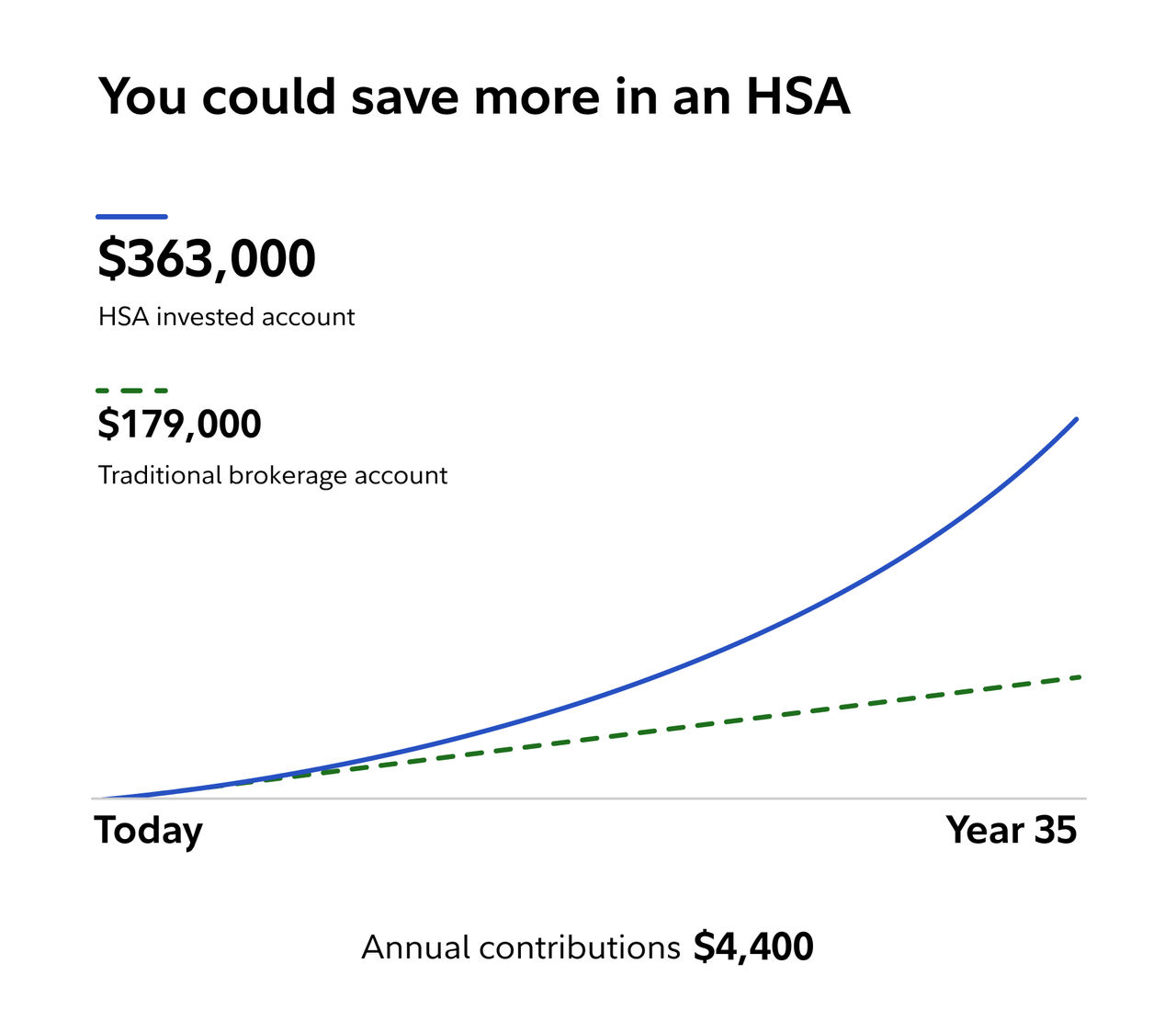
This chart is a hypothetical comparison. Investing involves risk of loss and performance is not guaranteed. Learn how this chart works.
Did you know? A 65-year old retiree in 2026 can expect to pay $185,500 (after tax) to cover health care costs9 (that's over $400K in 35 years with inflation).10
Contributing $4,400 per year for 35 years could result in $363,000 in savings vs $179,000 in a traditional brokerage account, thanks to the unique tax advantages.
Plus, after the age of 65, HSA funds used for non-medical expenses are taxed the same as withdrawals from a traditional IRA, giving you added flexibility.
This chart is a hypothetical comparison. Investing involves risk of loss and performance is not guaranteed. Learn how this chart works.
Our robo advisor, backed by real humans, chooses and rebalances your investments for you. Designed for investing goals of 3+ years.
Small businesses
Attract and retain talent and manage health care expenses for your small business by offering the award-winning5 Fidelity HSA®, with no fees for employers or employees. Self-employed? You may be able to save on FICA taxes.
Large businesses
You already help your employees save for retirement. With the award-winning12 Fidelity workplace HSA, you can help them save for and manage their medical expenses too—all in one place.
Insurance brokers and consultants
The Fidelity HSA® can help you deliver a health benefits strategy to fit your clients' and their employees' needs. We’ll support you and your clients year round with reporting tools, insights, and data-driven analysis to help keep their strategies on track.
Your clients can help their employees save for and manage their medical expenses—all in one place—with no fees or minimums to invest.4
Health insurers
The Fidelity HSA® can help strengthen your health plan offering with secure accounts, easy payments, and a wide range of investment options.
Your plan members will also be supported with personalized communications and account help tools and resources.
Health care providers
An HSA is one of the best ways to save for treatments, surgery, and other qualified medical expenses. And it can help your patients pay for their health care costs.
Check out educational resources we have available for you, your practice, and your patients.
 #1 HSA provider12
2019-2025
 Widest investment options, low fees, best savings rates, and zero investment threshold13
2026

Here's how to get the most out of a health savings account.
 6 min
6 min 
Turning 26 or choosing your own plan for the first time?
5 min 
Don't miss these tax-advantaged accounts.
5 min We can help you get started.
1. As defined by the Internal Revenue Code Section 213(d); a qualified medical expense.
2. With respect to federal taxation only. Contributions, investment earnings, and distributions may or may not be subject to state taxation.
3. There may be mutual funds or other investments that require a minimum amount to invest, but Fidelity does not require a minimum to start investing.
4. There are zero account fees and zero account minimums for Fidelity HSAs® offered through Fidelity.com to individuals and employers. There may be commissions, interest charges, and other expenses associated with transacting or holding specific investments (e.g., mutual funds), or selecting certain account features or types (e.g., managed accounts). When a Fidelity HSA® is offered as part of an employer’s benefits package (which occurs through NetBenefits®), Fidelity charges the employer a recordkeeping fee. This is a common fee charged by HSA providers. This fee may be up to $48/year, but it could be reduced or waived depending on the HSA balance. Employers may pass this fee on to their employees. Contact the employer for more information. Accounts that have been opened through, or are serviced by, an intermediary, or in connection with your workplace benefits, may incur additional fees or restrictions. Account minimums may apply to certain investments, including the purchase of some Fidelity mutual funds that have a minimum investment requirement. If you choose to invest in mutual funds, underlying fund expenses still apply. For more information and details, see the fund's prospectus and/or www.fidelity.com/commissions.
5. Data for comparison is sourced from Morningstar's 2025 Health Savings Account Landscape Report, published October 16, 2025 as well as each providers public website. Morningstar rated top retail HSA providers for two distinct use cases: HSAs as a spending account to cover current medical costs and HSAs as an investment account to save for future medical expenses. Morningstar assumed a $2,500 spending account balance and a $20,000 investment balance for their assessment. Third-party providers may waive fees or provide an enhanced rate on cash based on balances above the default amounts Morningstar used in their report. Investing services may be provided by third party firms. Please see each providers website for additional information regarding their offering’s fees and features. Source for Morningstar Report: “The Best HSA Providers of 2025” by Greg Carlson and Margaret Giles. © 2025 Morningstar, Inc. All Rights Reserved.
6. In assessing HSA investment accounts, Morningstar’s analysts prioritized low, transparent fees; sound investment menus that steer clear of questionable asset classes and limit overlapping positions; high-quality investment strategies and no required spending account balance in order to invest. Morningstar scored each investment account on four criteria: price (40% weighting), menu design (20%), quality of investments (20%), and investment threshold (20%). Morningstar weighted and combined each category score to arrive at an overall score and rank the providers.
7. Money market funds have different characteristics than bank sweep accounts and savings accounts. Read any fund's prospectus carefully. An important difference is that bank sweep products have FDIC protection, which guarantees principal and interest within limits; and money market funds and non-bank default sweep products do not. See more information about safeguarding your accounts. The Fidelity fund yield is the average amount earned by the fund after expenses over the past 7 days (per date indicated) and annualized. The comparison APY is the amount of total interest earned on a bank product in 1 year. Comparison is based on information available on each providers public of Sept 2, 2026 and is subject to change. Please carefully consider ALL fees, features and characteristics for each account carefully.
8. When you open a new Fidelity HSA, we automatically put your uninvested cash into Fidelity Government Cash Reserves unless you choose another option. 7-day yield is as of the date quoted and subject to change.
9. The Retiree Health Care Cost Estimate (RHCCE) is based on a single person retiring in 2026, 65-years-old, with life expectancies that align with Society of Actuaries' RP-2014 Healthy Annuitant rates projected with Mortality Improvements Scale MP-2020 as of 2022. Actual assets needed may be more or less depending on actual health status, area of residence, and longevity. Estimate is net of taxes. The Fidelity Retiree Health Care Cost Estimate assumes individuals do not have employer-provided retiree health care coverage, but do qualify for the federal government’s insurance program, original Medicare. The calculation takes into account Medicare Part B base premiums and cost-sharing provisions (such as deductibles and coinsurance) associated with Medicare Part A and Part B (inpatient and outpatient medical insurance). It also considers Medicare Part D (prescription drug coverage) premiums and out-of-pocket costs, as well as certain services excluded by original Medicare. The estimate does not include other health-related expenses, such as over-the-counter medications, most dental services and long-term care.
10. This assumes a 2.5% annual inflation rate that remains constant over the course of the time horizon.
11. There is no minimum amount required to open a Fidelity Go® account. However, in order for us to invest your money according to the investment strategy you've chosen, your account balance must be at least $10.
12. Morningstar rated top retail HSA providers for two distinct use cases: HSAs as a spending account to cover current medical costs and HSAs as an investment account to save for future medical expenses. Results published in "2019-2025 Health Savings Account Landscape."
13. Investor's Business Daily identified "Best HSA For 2026" based on fees, account features, investing options, and savings rates, as of November 14, 2025.
Fidelity Go® provides discretionary investment management and, in certain circumstances, nondiscretionary financial planning for a fee. Advisory services are offered by Strategic Advisers LLC (Strategic Advisers), a registered investment adviser. Brokerage services are provided by Fidelity Brokerage Services LLC (FBS), and custodial and related services are provided by National Financial Services LLC (NFS), each a member of NYSE and SIPC. Strategic Advisers, FBS, and NFS are Fidelity Investments companies.
HealthEquity interest rates reflect the effective "Enhanced Rates" default sweep for a $2,000 average HSA balance as of Sept 2, 2026 per the HealthEquity website disclosures (available to access for existing customers). Higher HSA balances may have higher rates. Enhanced Rates options consists of interest-bearing group annuity contracts issued by participating insurance companies for the customer's HSA cash balance. Principle and interest are subject risk of loss and not covered by deposit insurance. Interest rates are subject to change. Annuity guarantees are subject to the claims-paying ability of the Issuing insurance company.
Optum APY reflects the Standard HSA Interest Rates for a $2,000 average HSA balance as of Sept 2, 2026 per the Optum Bank website disclosures (available to access for existing customers). Interest rates are subject to change.
HSA Bank reflect the Standard HSA Interest Rates for a $2,000 average HSA balance as of Sept 2, 2026 per the HSA Bank website disclosures (available to access for existing customers). Higher HSA balances may have higher rates. Interest rates are subject to change.
There may be funds that require a minimum amount to invest, but Fidelity does not require a minimum to start investing.
The information provided here is general in nature. It is not intended, nor should it be construed, as legal or tax advice. Because the administration of an HSA is a taxpayer responsibility, customers should be strongly encouraged to consult their tax advisor before opening an HSA. Customers are also encouraged to review information available from the Internal Revenue Service (IRS) for taxpayers, which can be found on the IRS Web site at www.IRS.gov. They can find IRS Publication 969, Health Savings Accounts and Other Tax-Favored Health Plans, and IRS Publication 502, Medical and Dental Expenses (including the Health Coverage Tax Credit),online, or you can call the IRS to request a copy of each at 800.829.3676.
Investing involves risk, including risk of loss.
Before investing, consider the funds' investment objectives, risks, charges, and expenses. Contact Fidelity for a prospectus or, if available, a summary prospectus containing this information. Read it carefully.
The third-party trademarks and service marks appearing herein are the property of their respective owners.
Fidelity Brokerage Services LLC, Member NYSE, SIPC, 900 Salem Street, Smithfield, RI 02917
1269836.2.2
 Article