Benefits of a Fidelity Self-employed 401(k)

Higher contribution limits
Up to $72,000 for 2026 (employer & employee), plus "catch-up" options for ages 50+.

Tax advantages
Potential deductions for employers, with employee tax advantages through traditional and Roth contributions.

No fees
No account fees for your plan with Fidelity.1,2
One plan, multiple ways to save on taxes
Looking to reduce your taxable income and grow your savings tax-advantaged? A self-employed 401(k) from Fidelity can help.
Cut your income taxes: Deduct traditional 401(k) contributions from your business and/or personal tax returns, as applicable.
Tax-free growth potential: Your investments have the potential for tax-free growth until withdrawal.
Add a Roth option: Make after-tax contributions that may grow—and be withdrawn—tax-free if requirements are met.


Self-employed 401(k) contribution limits
Easy online account opening
In a few clicks, we'll walk you through the questions to complete your:
- Self-employed 401(k) account application: This is where we gather all your important personal and business information to get your account opened.
- Adoption agreement: This is the form used to define the eligibility requirements you'd like to set for your plan.
Keep in mind: By selecting Open an account, new and existing customers also have the ability to add the optional Roth feature.
Note: Some situations below may require you to print and mail the forms to Fidelity.
Do any of these situations apply?
- You're not the plan administrator
- You operate multiple qualified plans for your business
- You're part of an affiliated group of employers
- You need to integrate the plan with Social Security
- You are not a U.S Citizen
If so, please download and complete the following forms, and return them to Fidelity (keep a copy for your records):
- Self-employed 401(k) adoption agreement (PDF)
- Self-employed 401(k) account application for yourself and each participating owner (including the business owner's spouse, if applicable).
Please review, download, save (or print for your records), and complete if applicable:
Ways to contribute
Build your savings today by using one of the following options:

Electronic funds transfer (EFT)
Move money from an external bank to your Fidelity account.

Transfer from a Fidelity account
Make a contribution from a Fidelity account.

Mobile check deposit
Using your phone or mobile device, deposit in a snap using just your camera and the Fidelity app.
Contribution limits
| Contribution type | 2025 maximum4 | 2026 maximum4 |
|---|---|---|
| Employee Salary Deferral Contributions | $23,500 | $24,500 |
| Catch-up opportunity (Ages 50-59 and age 64+) | $7,500 | $8,000 |
| Catch-up opportunity (Ages 60-63) | $11,250 | $11,250 |
| Employer profit sharing contribution5 | $70,000 | $72,000 |
Note: The employee salary deferral contribution has one overall annual limit that’s aggregated between your traditional and Roth contributions to a Self-employed 401(k). |
||
Want to calculate your limit based on your personal circumstances? Use our fast and easy Small Business Retirement Plan Contribution Calculator.
Contribution deadlines
- The year your plan is established, contribution deadlines are based on your business structure and other considerations. See establishment deadlines.
- For subsequent years, employee salary deferrals and company profit sharing contributions must be completed by business's tax filing deadline, including extensions.
- Commencement of salary deferral is a written salary deferral election (PDF), typically by the business's fiscal year end.
Call a retirement specialist at 800-544-5373, and say "retirement representative," to get help with a rollover into a Fidelity Self-employed 401(k).
Ways to move outside accounts to a Fidelity Self-employed 401(k)
If you have retirement accounts elsewhere, you can still take advantage of Fidelity Self-employed 401(k).

Have a Self-employed 401(k) elsewhere?
Transferring to Fidelity is fast and easy.
Transfer all or part of your non-Fidelity Self-employed 401(k)—including stocks, bonds, mutual funds, and other security types—without needing to sell your investments.3
How to roll over an old workplace plan to a Fidelity Self-employed 401(k)
If you have an old workplace retirement account, such as a 401(k), you have the option to roll it over into a Self-employed 401(k). Be sure to consult with a tax advisor before making a change to your retirement plan. If you decide to rollover assets, here are the steps:
- Start by opening a Fidelity Self-employed 401(k) online
- Initiate the rollover of your money by calling your workplace plan provider or using their website
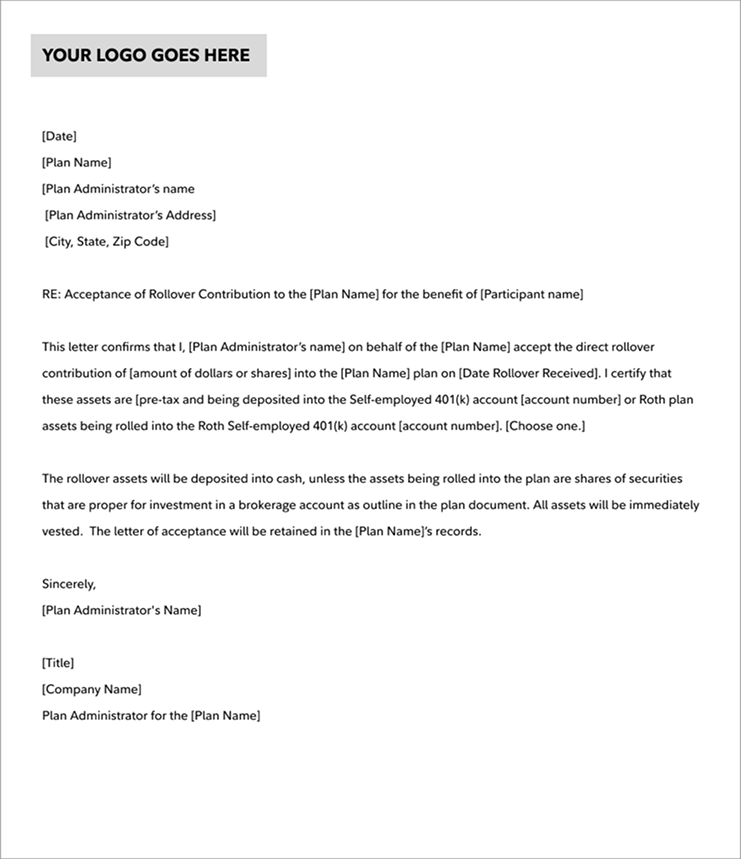
- Prepare a Letter of Acceptance (LOA) to accompany your rollover
We've included a sample letter to show you what to include your LOA. Fidelity requires a copy of the LOA, and your old provider may require a copy as well. Keep a copy for your plan records.
Please note: You cannot move pre-tax assets into a Roth Self-employed 401(k) account; Fidelity does not support conversions. - Deposit your money in your Fidelity Self-employed 401(k), along with your LOA
Your old workplace plan provider will give you a choice:
• Have your old provider send the money directly to us, or
• Deposit it yourself
You have multiple options for sending the money to Fidelity. If by check, make it payable to Fidelity Investments, FBO [name of plan participant]. Checks do not need to be endorsed and should include your Fidelity Self-employed 401(k) account number.
If your old provider sends the money to Fidelity, be sure to mail your LOA to Fidelity in advance of the check’s arrival, with a letter instructing Fidelity to expect a rollover check. For support, please call 800-544-5373 and say "Small Business Retirement."
Frequently asked questions

Get started with your activated plan
Once you've established your Self-employed 401(k), don't forget to:
- Become familiar with the Defined Contributions Retirement Plan document (PDF), which contains the IRS-approved rules for your plan, as well as a definition of terms. The plan administrator must abide by the rules detailed in the plan document.
- Make timely contributions. Missing your deadline can cost you money. For details, see Contribute to your Self-employed 401(k).
Remember to keep good records
You'll want to keep a file of all relevant documents, starting with the forms used to establish your plan. This is not a comprehensive list, but among the important documents you will need to keep are the:
- Defined Contributions Retirement Plan document (PDF)
- The Defined Contribution Retirement Plan-Trust Agreement
- Designated Roth contributions addendum to a Defined Contribution Retirement plan
- Defined Contribution Retirement Plan - 401(k) Salary Reduction Agreement
- The Defined Contribution Retirement Plan - Profit Sharing/401Ik) Plan Adoption Agreement No. 001
- Records of all contributions and distributions
- The year of first contribution if you have made Roth deferrals
- Any corrections of errors of operation, should they occur

Over the life of your self-employed 401(k), you may have reason to amend your adoption agreement. You should keep any older versions, along with the most current version. You should operate your plan under the most recent version of the plan document, however, you should keep a copy of all versions your plan has operated under. Note: Fidelity doesn't retain these records on your behalf.
Be aware of who's eligible for your plan
Fidelity's Self-employed 401(k) is designed for self-employed individuals or small owner-only businesses with no employees other than spouse-employees.
Should you hire an employee, even part time, you may be required to cover them with your plan.
The rules for eligibility and how much you must contribute for employees can be very complicated, and you'll likely need to consult a tax advisor for assistance.
Rules for participation
As a result of the SECURE Act and the SECURE Act 2.0, the strictest age and service requirements that you can apply to an employee before they can participate in a 401(k) are:

- The employee must be at least 21 years old with service time of at least 1 year (12 months) and no less than 1,000 hours
of service,
OR
- The employee must have completed 3 consecutive years (36 months) of service, with at least 500 hours of service or more each year, provided the employee turned age 21 by the close of the third year. The later could make 401(k) deferrals under the plan available to certain part-time employees starting 1/1/2024. Beginning in 2023, the SECURE Act 2.0 reduces the 3-year rule to 2 years. This could affect employees starting 1/1/2025.
Note: In accordance with IRS Notice 2024-73, employees' ability to defer into the plan is delayed until 1/1/26.

Rules and tax ramifications for withdrawals
Participants are eligible for a withdrawal once a triggering event occurs. To see a full list of triggering events and to submit a distribution request, please see the Defined Contribution Retirement Plan One-Time Withdrawal form (PDF).
From the Traditional Self-employed 401(k) account: Distributions are taxable as ordinary income. If you withdraw before age 59½, you may be subject to an IRS penalty. Once you reach age 73, you must take a required minimum distribution (RMD) annually, even if you're still working. Distributions from a Traditional Self-employed 401k are penalty-free provided certain conditions or circumstances are met, please see the Defined Contribution Basic Plan Document (PDF) for exceptions and rules.
From the Roth Self-employed 401(k) account: Qualified distributions from your designated Roth account are tax free. To be qualified, your designated Roth account must have met its 5-year aging requirement and your distribution must be made at age 59½ years of age or older, due to disability, or from an inherited account. Unqualified distributions are done proportionally between your contributions and earnings. The earnings may be subject to taxes and penalties.
Helpful resources
More resources for your small business
Have more questions?
 Call 800-544-5373 and say "Small Business Retirement"

560603.35.0