ETF/ETP* Screening-More Data, Better Results, Less Time

The new ETF/ETP Screener gives you powerful features based on the feedback of hundreds of thousands of Fidelity customers and their years of experience with our investment screening tools.

Faster and Easier Screening

1 of 3 Next Next Slide

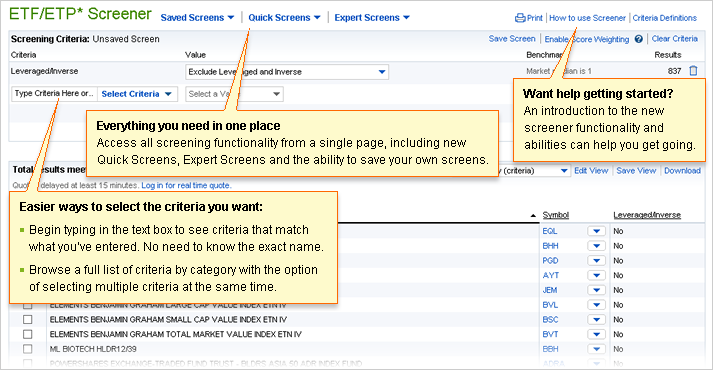
Everything you need in one place

Access all screening functionality from a single page, including new Quick Screens, Expert Screens and the ability to save your own screens.

Easier ways to select the criteria you want:

  • – Begin typing in the Criteria entry field to see criteria that match what you've entered. No need to know the exact name.
  • – Browse a full list of criteria by category with the option of selecting multiple criteria at the same time using your mouse or Enter key.

Want help getting started?

An introduction to the new screener functionality and abilities can help you get going.

A sample page that shows how to enter screener criteria or access saved and expert screens.

Access to More Features

Previous Slide Previous 2 of 3 Next Next Slide

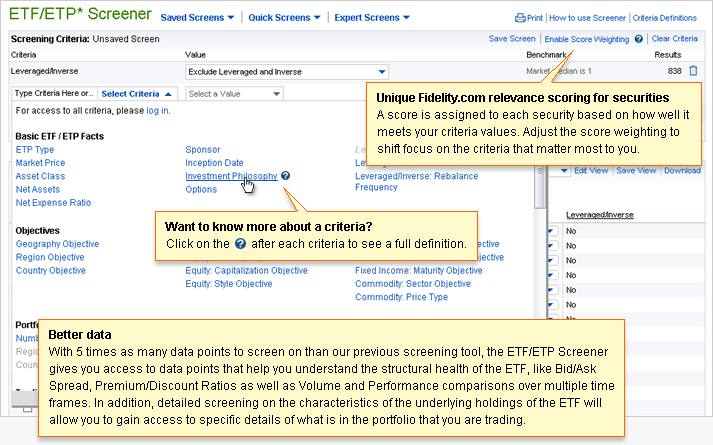
Unique Fidelity.com relevance scoring for securities

A score is assigned to each security based on how well it meets your criteria values. Adjust the score weighting to shift focus on the criteria that matter most to you.

Want to know more about a criteria?

Click on the question mark icon after each criteria, or click the Criteria Definitions link to see full definitions for all criteria.

Better data

With 5 times as many data points to screen on than our previous screening tool, the ETF/ETP screener gives you access to data points that help you understand the structural health of the ETF, like Bid/Ask Spread, Premium/Discount Ratios as well as Volume and performance comparisons over multiple time frames. In addition, detailed screening on the characteristics of the underlying holdings of the ETF will allow you to gain access to specific details of what is in the portfolio that you are trading.

A sample page highlighting key features added to the ETF/ETP Screener.

More Control Over Your Results

Previous Slide Previous 3 of 3

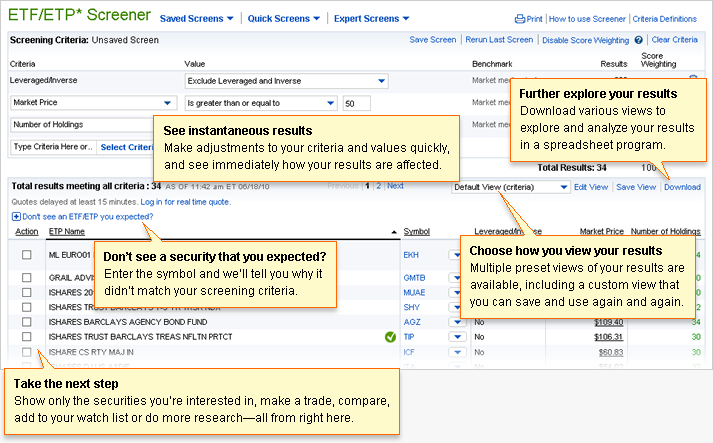
See instantaneous results

Make adjustments to your criteria and values quickly, and see immediately how your results are affected.

Further explore your results

Download various views to explore and analyze your results in a spreadsheet program.

Don’t see a security that you expected?

Enter the symbol and we’ll tell you why it didn’t match your screening criteria.

Choose how you view your results

Multiple preset views of your results are available, including a custom view that you can save and use again and again.

Take the next step

Show only the securities you’re interested in, make a trade, compare, add to your watch list or do more research-all from right here.

A sample page that shows how to enter screener criteria or access saved and expert screens.